
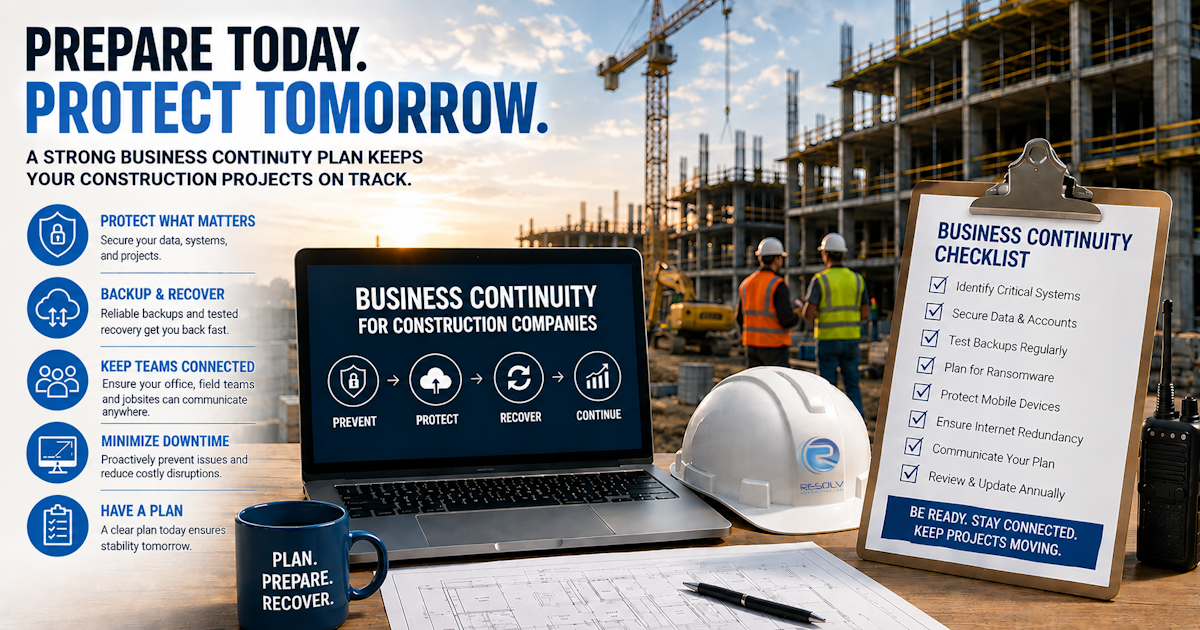
Construction companies are built around schedules, people, equipment, materials, and information.
When one part of the operation gets disrupted, everything can start to feel the effects.
A project manager can’t access important documents.
The accounting team can’t access financial systems.
The field team can’t communicate with the office.
Employees can’t access email.
A project management system becomes unavailable.
Or worse, ransomware or another security incident prevents the company from accessing critical information altogether.
At that point, the question isn’t:
“How quickly can IT fix the computer?”
The question becomes:
“How quickly can we get the business operating again?”
That’s where business continuity and disaster recovery come in.
What Is Business Continuity?
Business continuity is the ability of a company to continue operating—or restore critical operations quickly—when an unexpected disruption occurs.
For a construction company, that could mean maintaining access to:
- Project documents
- Accounting systems
- Project management software
- Scheduling information
- Employee records
- Client information
- Communication systems
- Cloud applications
- Financial information
Business continuity isn’t about preventing every possible problem.
That’s impossible.
It’s about making sure your company has a plan for when something does go wrong.
What Is Disaster Recovery?
Disaster recovery focuses specifically on restoring technology, systems, applications, and data after a disruptive event.
That event could be:
- Ransomware
- Hardware failure
- Accidental deletion
- Account compromise
- Network failure
- Cloud-service disruption
- Natural disaster
- Lost or stolen equipment
- Major software failure
The objective is simple:
Restore the technology the business needs to operate.
Business continuity is the broader strategy.
Disaster recovery is an important part of that strategy.
Why Construction Companies Need a Business Continuity Plan
Construction businesses are particularly dependent on information.
A project can involve hundreds—or thousands—of documents, communications, transactions, schedules, drawings, approvals, invoices, and other pieces of information.
Much of that information is digital.
And much of it needs to be available to people who aren’t sitting in the main office.
If technology becomes unavailable, the impact can extend beyond the IT department.
It can affect:
- Project schedules
- Field productivity
- Billing
- Payroll
- Communication
- Client relationships
- Subcontractor coordination
- Purchasing
- Estimating
- Management decisions
Technology downtime can become business downtime very quickly.
The Real Cost of Construction IT Downtime
When a system goes down, the obvious cost may be the technology problem itself.
But that’s only part of the equation.
Consider what happens when employees can’t access the systems they normally use.
People may start:
- Making phone calls
- Sending text messages
- Creating temporary spreadsheets
- Searching for old documents
- Re-entering information
- Waiting for systems to come back
- Using personal devices
- Manually tracking project information
The longer the disruption lasts, the more those workarounds can compound.
A two-hour IT problem isn’t necessarily just a two-hour IT problem.
It can create a backlog that takes much longer to resolve.
- Know Your Most Critical Systems
The first step in business continuity planning is identifying what your company actually needs to operate.
Not every application is equally important.
For example, you might determine that these systems are critical:
How employees communicate with clients, vendors, subcontractors, and one another.
Accounting
How your company manages billing, payments, payroll, and financial information.
Project Management
How project teams manage schedules, documents, tasks, and communication.
File Storage
Where important business and project information is stored.
Communication
How office and field employees stay connected.
Internet and Network Access
How employees connect to cloud applications and other business systems.
Once you’ve identified your critical systems, you can start planning how they would be restored.
- Determine How Much Downtime You Can Actually Tolerate
Not every system needs to be restored within five minutes.
But some may need to be restored much faster than others.
Ask:
How long can we operate without this system?
For example:
- Five minutes?
- One hour?
- Four hours?
- One business day?
- Several days?
This helps establish recovery priorities.
A construction company should know which systems need immediate attention and which can wait.
- Don’t Assume Your Backups Are Working
This is one of the most important questions a business can ask its IT provider:
“Have you actually tested our backups?”
It’s not enough to know that a backup job completed successfully.
You need confidence that the information can actually be restored.
A useful backup strategy should consider:
- What is being backed up?
- How frequently?
- Where is it stored?
- How long is it retained?
- Is it protected?
- Can it be restored?
- How quickly can it be restored?
- Has restoration been tested?
Resolv’s materials specifically emphasize determining whether data is being backed up in a way that would allow the business to recover quickly following an emergency or ransomware incident.
A backup isn’t the finish line. Recovery is.
- Protect Backups From the Same Threats as Your Production Systems
Imagine a ransomware attack encrypts your company’s files.
You turn to your backup.
Then you discover the backup is also compromised.
Now the problem is much bigger.
Backups should therefore be treated as part of your security strategy.
Businesses should consider protections such as:
- Restricted backup access
- Strong authentication
- Encryption
- Appropriate retention
- Monitoring
- Separate or protected backup copies
- Recovery testing
The goal is to make sure a serious incident doesn’t eliminate your recovery option at the same time it affects your primary systems.
- Have a Plan for Ransomware
Ransomware isn’t simply a computer problem.
It can become an operational problem.
If critical files or systems become unavailable, employees may not be able to perform normal work.
A ransomware response plan should establish:
Who needs to be notified?
Who is responsible for coordinating the response?
Which systems should be isolated?
Which systems are most critical?
How will backups be accessed?
How will employees communicate?
How will clients or other stakeholders be handled?
How will systems be restored?
You don’t want to answer these questions for the first time in the middle of an incident.
- Plan for Lost or Stolen Devices
Construction employees work in environments where laptops, tablets, and phones move around frequently.
Devices can be:
- Lost
- Stolen
- Damaged
- Left at a jobsite
- Left in a vehicle
Your continuity plan should account for this.
Ask:
What happens if a project manager’s laptop disappears tomorrow?
Can the device be remotely managed?
Can access be disabled?
Is company information encrypted?
Can the employee quickly get another device?
Can they securely access the systems they need?
A lost device shouldn’t automatically mean lost productivity—or exposed company information.
- Plan for an Internet or Network Outage
Cloud technology has made it easier for employees to work from almost anywhere.
But it also makes connectivity more important.
If your office loses internet access, employees may suddenly lose access to:
- Cloud applications
- File storage
- Project management
- Communication tools
- Online accounting systems
Construction companies should understand what happens during a connectivity failure.
Depending on the business, contingency options may include redundant connectivity, backup internet access, mobile connectivity, or alternative work locations.
The right solution depends on how your company operates.
- Make Sure Your Field Teams Are Included
A business continuity plan shouldn’t stop at the office.
Construction companies need to consider their field teams.
Ask:
If the office can’t access our systems, how will the jobsite operate?
If a jobsite loses connectivity, how will employees access critical information?
If a field device fails, how quickly can it be replaced?
If project documents become unavailable, where is the backup?
The field should be part of the continuity plan—not an afterthought.
- Don’t Forget Your People
Technology is only one part of business continuity.
Your employees need to know what to do.
For example, if someone receives a suspicious email, do they know who to contact?
If an employee loses a laptop, do they know how quickly they need to report it?
If systems go down, do employees know whether they should continue working, switch to another process, or wait for instructions?
A good plan gives employees clear instructions.
People shouldn’t have to guess during an emergency.
- Document the Plan
A business continuity strategy shouldn’t exist only in someone’s head.
Document:
- Critical systems
- Important contacts
- Recovery priorities
- Backup information
- Vendor contacts
- Internal responsibilities
- Communication procedures
- Recovery procedures
- Escalation procedures
And make sure the appropriate people know where that information is stored.
There’s a problem with keeping the disaster recovery plan only on the system you’re trying to recover.
Business Continuity vs. Backup: What’s the Difference?
This is a common question.
Backup
A backup is a copy of data or information that can potentially be restored.
Disaster Recovery
Disaster recovery is the process of restoring systems and technology after an incident.
Business Continuity
Business continuity is the larger strategy for keeping critical business operations functioning during and after a disruption.
Think of it this way:
Backup gives you information.
Disaster recovery helps restore technology.
Business continuity helps the business keep moving.
You need all three working together.
How Often Should a Construction Company Test Its Disaster Recovery Plan?
A plan that has never been tested is still a plan based on assumptions.
Testing can reveal problems such as:
- Missing data
- Incorrect permissions
- Failed backups
- Outdated documentation
- Unknown dependencies
- Missing vendor information
- Longer-than-expected recovery times
A test doesn’t have to mean shutting down your entire company.
Your IT provider can help determine appropriate ways to test restoration and recovery procedures without unnecessarily disrupting operations.
The important part is finding problems before you actually need the plan.
What Should a Construction Company Ask Its MSP?
If you’re evaluating your current IT provider, ask:
- What are our most critical systems?
- What happens if our primary systems become unavailable?
- Are all of our critical data and systems backed up?
- How often are backups tested?
- How quickly can our critical systems be restored?
- Are our backups protected from ransomware?
- What happens if an employee loses a laptop?
- What happens if our office loses internet access?
- How will our jobsites continue operating during an outage?
- Who is responsible for coordinating recovery?
- When was the last time our recovery process was tested?
- Where is our documented disaster recovery plan?
If you can’t get clear answers, that’s worth investigating.
Business Continuity for Construction Companies in Southern California
Construction companies throughout the Inland Empire, Orange County, and Los Angeles area may have employees, projects, vendors, and clients spread across multiple locations.
That makes technology resilience especially important.
A disruption at a single office shouldn’t necessarily bring every project to a standstill.
Business continuity planning should account for the way your company actually operates—including offices, remote employees, field teams, cloud applications, and jobsites.
For a construction company in Ontario or elsewhere throughout Southern California, that means building a plan around the actual technology and processes your team depends on.
How Resolv Consulting Can Help
Resolv Consulting takes a proactive approach to IT rather than waiting for something to break and then responding.
The company’s materials describe this philosophy directly: identify and eliminate issues before they disrupt the business, with the goal of reducing downtime and keeping employees productive.
That approach is particularly important when it comes to business continuity.
A strong IT partner should understand:
- What systems your business depends on
- Where your important information lives
- How your employees work
- How your field teams connect
- How your backups are configured
- What happens when something fails
- What needs to happen first during recovery
Resolv provides IT services including managed IT support, cybersecurity, backup and recovery, and related technology services designed around the needs of businesses.
The objective isn’t to make technology more complicated.
It’s to make your technology more reliable, secure, and resilient.
Final Thoughts
You don’t need to predict every disaster that could happen to your construction company.
You need to be prepared for the ones that could seriously disrupt the business.
Start with the basics.
Identify your critical systems.
Protect your accounts and devices.
Secure your backups.
Test your recovery process.
Plan for ransomware.
Prepare for connectivity failures.
Include your field teams.
Train your employees.
And document what everyone needs to do when something goes wrong.
Because the best time to discover that your disaster recovery plan doesn’t work is before you need it.
Your technology should help keep projects moving—not become the reason they stop.
Frequently Asked Questions
What is business continuity for a construction company?
Business continuity is a company’s ability to continue critical operations or restore them quickly following an unexpected disruption such as an IT outage, ransomware attack, hardware failure, network outage, or other event.
Why is business continuity important for construction companies?
Construction companies depend heavily on digital information for project management, communication, accounting, scheduling, documentation, and field operations. A technology disruption can therefore affect much more than the IT department.
What is the difference between backup and disaster recovery?
A backup is a copy of data that can potentially be restored. Disaster recovery is the process of restoring technology and systems after an incident. Business continuity encompasses the broader strategy for keeping critical business operations functioning.
How often should construction companies test their backups?
Backups should be monitored regularly and recovery procedures should be tested periodically. The specific testing schedule should depend on the company’s systems, risk, recovery requirements, and business operations.
What should a construction disaster recovery plan include?
A construction disaster recovery plan should identify critical systems, backup procedures, recovery priorities, responsible personnel, vendor contacts, communication procedures, and the steps required to restore important technology.
How can construction companies prepare for ransomware?
Companies can prepare by using strong authentication, cybersecurity protections, employee training, monitoring, secure backups, access controls, and a documented incident response and recovery process.
Should jobsites be included in a business continuity plan?
Yes. Construction companies should consider how field employees will access project information, communicate with the office, and continue working if jobsite connectivity, devices, or central systems become unavailable.
What happens if a construction company loses internet access?
The impact depends on how heavily the company relies on cloud applications and online services. A continuity plan should identify which operations are affected and whether backup connectivity or alternative work procedures are appropriate.
Can an MSP create a business continuity plan for a construction company?
An MSP can help assess technology dependencies, protect systems and data, manage backups, test recovery procedures, develop technology recovery plans, and help establish processes for responding to IT disruptions.
Is disaster recovery only necessary for large construction companies?
No. Construction companies of all sizes can experience hardware failures, ransomware, lost devices, accidental deletion, connectivity problems, and other disruptions. The appropriate recovery strategy should be scaled to the company’s size and technology requirements.